Systems ·
Lord of Mysteries Points Players to Two Graphics Settings for Smoother Combat
The official Chinese guide recommends disabling V-sync and lowering other players' effect quality. Here are the menu labels and settings it shows.
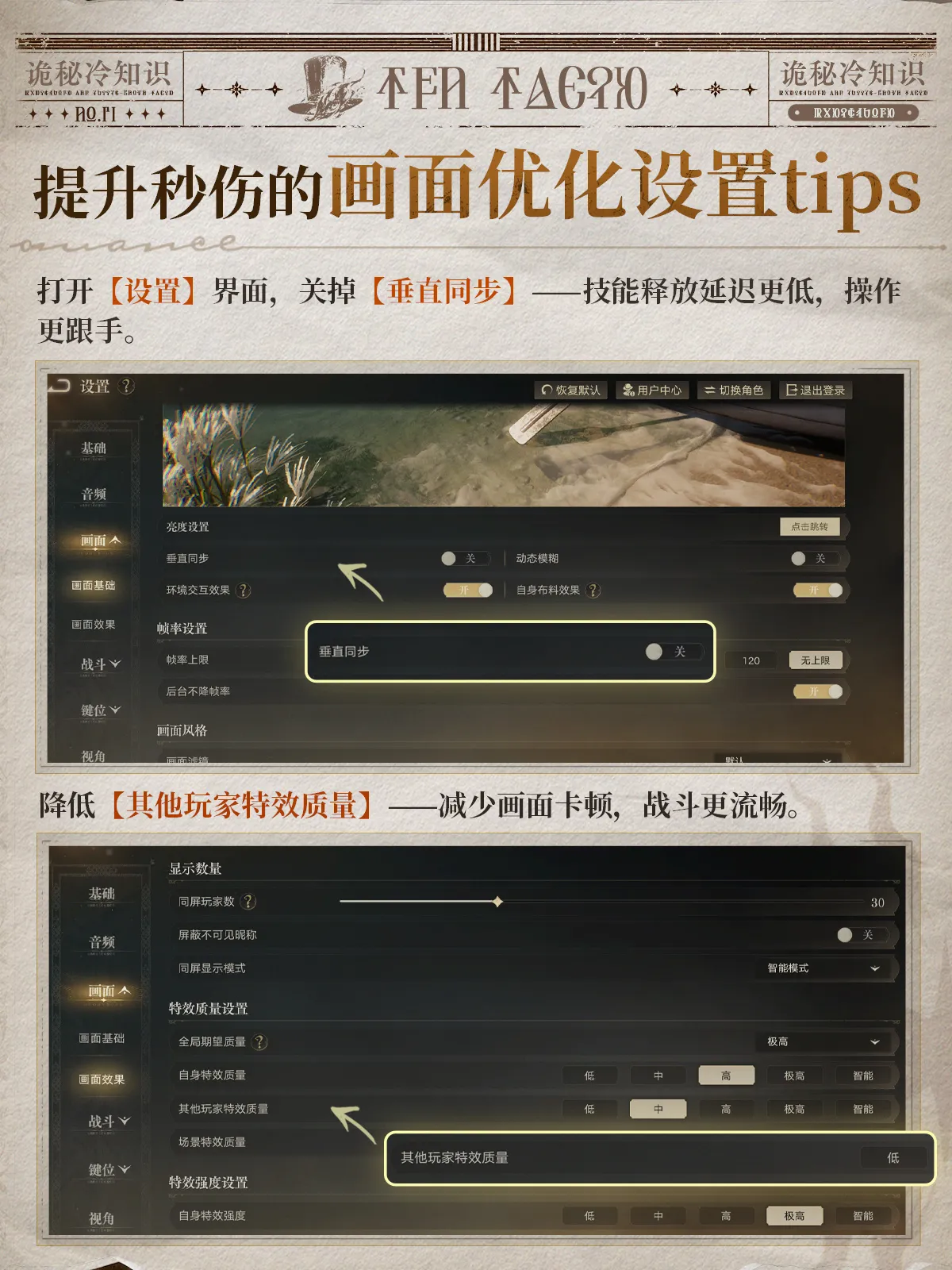
Lord of Mysteries has separate graphics controls for your own effects and those of other players. Its October 13 illustrated tips guide recommends reducing the latter, alongside switching off V-sync, to improve combat responsiveness in the Chinese MMO.
The October 13 post from the official game account shows both settings in the client. The developer says disabling V-sync reduces the delay when using skills, while lowering other players’ effect quality reduces stuttering. The panel provides no frame-rate measurements or hardware test results, so it does not establish how much either change will help on a particular machine.
Open Settings (设置), then expand Graphics (画面). Under Basic Graphics (画面基础), find V-sync (垂直同步) and switch it to Off (关). The upper screenshot highlights that control with an enlarged inset. The frame-rate limit appears farther down the same screen, but the written recommendation concerns V-sync.
For the second change, select Graphics Effects (画面效果). Find Other Players’ Effect Quality (其他玩家特效质量). The enlarged example shows Low (低). Your Own Effect Quality (自身特效质量) has its own row directly above it, so check the label before changing the setting.
| Chinese label | English meaning |
|---|---|
| 设置 | Settings |
| 画面 | Graphics |
| 画面基础 | Basic Graphics |
| 垂直同步 | V-sync |
| 关 | Off |
| 画面效果 | Graphics Effects |
| 其他玩家特效质量 | Other Players’ Effect Quality |
| 自身特效质量 | Your Own Effect Quality |
| 低 | Low |
For another menu guide from the same post, see the missed reward recovery shop instructions. Record your current graphics settings before trying the two changes, then compare the result in the same activity.